

Browser extension security is the practice of protecting browsers from malicious or vulnerable extensions that can compromise privacy, data, and authentication credentials. Extensions sit between your browser and every website you visit, which makes them a uniquely powerful attack surface. A single over-permissioned add-on can harvest session tokens, exfiltrate form data, or silently redirect traffic without triggering any browser warning. The Cloud Security Alliance and OWASP both identify browser extensions as a high-priority risk category, and recent vulnerabilities, including a CVSS 8.32 severity flaw patched in Urban VPN in May 2026, confirm the threat is not theoretical.
What are the main security risks from browser extensions?
Browser extension vulnerabilities fall into several well-defined categories, and understanding them is the first step toward meaningful protection.
Permission over-scoping is the most widespread problem. Extensions that request wildcard host permissions, written as *://*/*, gain the ability to read and modify all visited pages. Google's Manifest V3 framework tightened some controls, but it did not eliminate this risk. An extension with broad host access can intercept form submissions, inject scripts, and alter page content without any visible sign to the user.
Silent automatic updates create a supply chain risk that most users never consider. Extensions update automatically and silently without user consent unless new permissions are required. A legitimate extension acquired by a malicious actor can push a compromised update overnight. The user who installed a trusted tool months ago has no idea the code running in their browser has changed.
Insecure messaging APIs are a subtler but equally serious flaw. Extensions communicate internally using message-passing APIs, and failure to validate message sender origin allows malicious websites to invoke privileged extension actions. Known CVEs in popular extensions have exploited this exact flaw to exfiltrate data or bypass access controls.
Credential and session token theft represents the most direct path to account compromise. Extensions with cookie access permissions can capture session cookies and authentication tokens, including HttpOnly cookies that are normally inaccessible through JavaScript. Once an attacker holds a valid session token, multifactor authentication offers no protection.
"A clean extension can become malicious overnight without user awareness. The install-and-forget model is fundamentally incompatible with modern threat environments."
The attack vectors above combine to create a threat profile that is difficult to detect and easy to exploit. Recognising them is the foundation of any credible defence.
How can individuals secure their browser extensions effectively?
Securing extensions at the individual level requires consistent habits, not one-off audits. The following steps address the most common failure points.
- Audit your installed extensions now. Open your browser's extension manager and review every item. Remove anything you do not actively use. An unused extension is an unmonitored risk.
- Check permissions before installing. Any extension requesting access to all websites, your clipboard, or your cookies deserves scrutiny. Prefer extensions from publishers with a verified track record and a clear privacy policy.
- Use browser profiles to isolate sensitive activity. Create a separate browser profile for banking, work email, or any session involving sensitive credentials. Extensions installed in one profile do not run in another.
- Enable NoScript or an equivalent allowlist tool. Blocking JavaScript by default and enabling it only for trusted domains mitigates cross-site scripting and cross-site request forgery risks effectively. This is the most technically aggressive individual control available.
- Monitor for silent updates. Check your extension manager periodically for version changes. Some browser privacy tools and third-party auditing utilities flag when an extension updates, giving you a chance to review the changelog before the new code runs.
- Treat unknown publishers as untrusted by default. Extensions impersonating popular AI assistants and originating from unknown publishers are high risk and should be removed immediately. The Chrome Web Store and Firefox Add-ons catalogue both host malicious extensions that pass initial review.
Pro Tip: Create a dedicated browser profile with zero extensions for any session involving financial accounts or sensitive work data. The marginal inconvenience is far smaller than the cost of a credential breach.
The goal is not to eliminate all extensions. It is to know exactly what is installed, why it is there, and what it can access.

What enterprise strategies improve browser extension security?
Enterprises face a harder problem than individuals. Hundreds or thousands of endpoints, each with a different extension inventory, create an attack surface that no manual process can manage reliably.
Policy-based allowlisting is the most effective control currently available. Group Policy on Windows and Mobile Device Management platforms such as Microsoft Intune and Jamf allow administrators to define explicit approved extension lists, blocking all others regardless of what appears in the browser store. This approach eliminates shadow extensions and attacker-acquired add-ons in a single policy change.
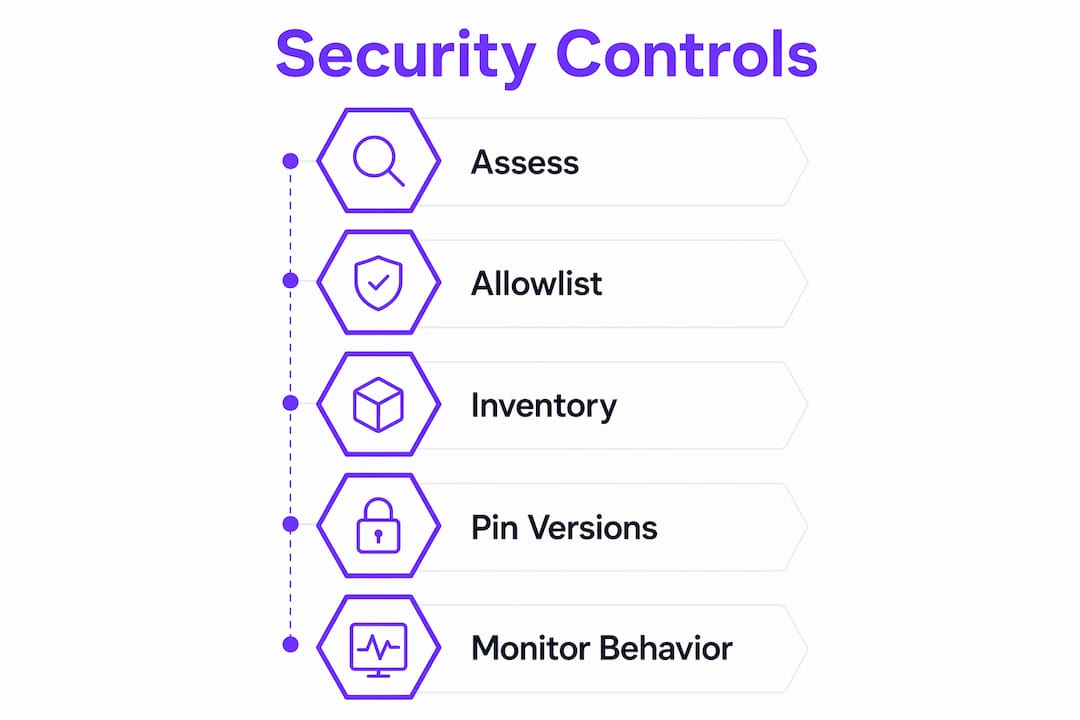
Continuous inventory matters more than periodic reviews. Manual, intermittent extension audits miss the window between a malicious update and its detection. Automated inventory tools integrated with endpoint detection platforms provide real-time visibility into what is installed across the fleet. This is not a luxury for large enterprises. It is a baseline requirement.
Version pinning reduces supply chain exposure. Enterprises can pin approved extensions to specific versions and manage updates through a controlled release process rather than accepting automatic updates from the browser store. This eliminates the overnight-compromise scenario described above.
Behaviour-based monitoring adds a detection layer. Even allowlisted extensions can be compromised. Monitoring network traffic from browser processes, flagging unusual outbound connections, and correlating extension activity with threat intelligence feeds catches post-compromise behaviour that policy controls alone cannot prevent.
| Control | Mechanism | Risk addressed |
|---|---|---|
| Allowlist enforcement | Group Policy / MDM | Shadow extensions, unknown publishers |
| Version pinning | Managed update channels | Silent malicious updates |
| Continuous inventory | Endpoint detection integration | Undetected installs and changes |
| Behaviour monitoring | Network and process telemetry | Post-compromise exfiltration |
Pro Tip: Align your extension allowlist review cycle with your software asset management process. Quarterly reviews tied to existing governance workflows are far more likely to happen consistently than ad hoc security audits.
Enterprises that treat browser extension governance as part of their endpoint security programme, rather than a browser-specific afterthought, close one of the most commonly overlooked attack vectors in the modern threat environment.
Why are AI browser extensions a growing security threat?
Shadow AI extensions represent the fastest-growing category of browser security risk in 2026. These are extensions that impersonate well-known AI assistants, including ChatGPT, Claude, and Gemini, while operating with permissions that far exceed what any legitimate assistant requires.
The Cloud Security Alliance identified malicious AI extension campaigns in March 2026 exploiting broad permissions including cookie access and clipboard capabilities. The scale is significant. Malicious AI extensions have penetrated over 20,000 enterprise tenants, often installed by employees seeking productivity tools without IT approval.
The specific threats these extensions introduce include:
- Data exfiltration through conversation scraping. An AI assistant extension with page-read permissions can capture everything typed into a browser, including credentials, internal documents, and client data, and transmit it to an external server.
- Indirect prompt injection. Adversarial instructions embedded in web content can manipulate an AI extension into performing actions the user did not authorise. A malicious webpage can instruct the extension to forward clipboard contents or submit forms on the user's behalf.
- Agentic capability abuse. Extensions marketed as passive assistants increasingly include agentic features, the ability to click, fill forms, and navigate autonomously. These capabilities dramatically expand the potential damage from a compromised or malicious extension.
"Shadow AI extensions are not just a productivity risk. They are a data exfiltration channel operating with user-level trust and enterprise-level access."
The mitigation strategy for AI extensions follows the same logic as general extension security, but requires stricter enforcement. Allowlist only verified, IT-approved AI tools. Monitor for extensions claiming AI functionality from unrecognised publishers. Distinguish between passive AI features and agentic capabilities, and apply tighter controls to the latter.
Key takeaways
Browser extension security requires continuous policy enforcement, not one-off audits, because extensions update silently and the threat landscape changes faster than manual reviews can track.
| Point | Details |
|---|---|
| Wildcard permissions are the core risk | Extensions with *://*/* access can read and modify every page you visit. |
| Silent updates enable overnight compromise | A trusted extension can become malicious without any user prompt or warning. |
| Allowlisting is the strongest enterprise control | Group Policy and MDM enforcement block shadow extensions before they can execute. |
| AI extensions expand the attack surface | Shadow AI add-ons have reached over 20,000 enterprise tenants and introduce agentic risks. |
| Individual hygiene reduces personal exposure | Auditing permissions, using browser profiles, and enabling NoScript cuts most individual-level risk. |
What I have learned from years of watching extension threats evolve
The uncomfortable truth about browser extension security is that most organisations treat it as a browser problem rather than an endpoint security problem. That framing leads to under-investment and delayed response.
I have watched teams spend considerable effort hardening network perimeters while leaving extension inventories completely unmanaged. The irony is that a single over-permissioned extension running in a developer's browser can bypass every network control in place. It does not need to exploit a firewall. It already has user-level access to every authenticated session in that browser.
The rise of AI assistant extensions has made this worse. Employees install them because they are genuinely useful, and IT teams often lack the visibility to know they exist. The result is a growing category of unmanaged, high-permission software running inside the browser on every device.
My recommendation is straightforward. Treat extension governance the same way you treat software asset management. Maintain an approved list. Enforce it with policy. Monitor for deviations. Review the list on a fixed schedule. This is not a technically complex programme. It is a governance discipline that most organisations simply have not prioritised.
The future of browser extension architecture points toward more sandboxing and tighter permission models, but those changes will take years to reach full adoption. Until then, the controls that exist today, allowlisting, version pinning, and behaviour monitoring, are sufficient if applied consistently.
— Marcus
How Gamiprotocol supports your digital security infrastructure

Gamiprotocol is built on a multi-layer architecture that prioritises verified, tamper-proof interactions across digital environments. Its on-chain settlement model means every user action and reward distribution is validated without relying on unverified third-party code, which is precisely the kind of trust model that browser extension risks undermine. For businesses building secure digital ecosystems, Gamiprotocol's approach to verified engagement and policy-driven reward logic offers a foundation that does not depend on the browser extension layer being clean. Explore how Gamiprotocol's infrastructure supports secure, auditable digital engagement at scale.
FAQ
What is browser extension security?
Browser extension security is the practice of identifying and mitigating risks posed by browser add-ons, including malware, data exfiltration, and permission abuse. Extensions run with elevated browser privileges, making them a high-value target for attackers.
How do I know if a browser extension is safe?
Check the publisher's identity, the permissions requested, and the number of active users. Extensions requesting access to all websites from unknown publishers carry the highest risk and should be avoided or removed.
Can browser extensions steal passwords?
Extensions with cookie access permissions can capture session tokens and authentication credentials, including HttpOnly cookies that JavaScript cannot normally access. This makes credential theft a realistic risk from over-permissioned extensions.
What is the best way for businesses to control browser extensions?
Group Policy and MDM enforcement combined with continuous inventory monitoring represent the most effective enterprise controls. Allowlist-only policies block shadow extensions before they can execute.
Are AI browser extensions more dangerous than standard ones?
AI assistant extensions frequently request broader permissions than standard tools and increasingly include agentic capabilities. Malicious AI extensions have reached over 20,000 enterprise tenants, making them a higher-risk category that warrants stricter allowlist controls.